
Download RER Video Converter – video converter, convert video, video to mp4, video to audio, audio extraction, format conversion, video editing tool, video utility
Overview
RER Video Converter is a dedicated utility designed for users who need to convert video files between various formats with precision and efficiency. As a productivity tool, it addresses the common challenge of format incompatibility across devices, platforms, and media players. Whether users are transferring videos from smartphones, editing content for social media, or preparing files for playback on older hardware, RER Video Converter provides a reliable solution. The app is tailored for individuals and professionals who require consistent, high-quality conversions without the complexity of advanced video editing software.
Developed by RER Soft, the application is positioned as a comprehensive video format conversion tool. Its primary function is to support a wide range of input and output formats, enabling seamless interoperability across digital ecosystems. Real-world use cases include preparing videos for YouTube uploads, converting mobile recordings for desktop playback, or extracting audio from video content for podcasts or music libraries. The tool’s role in the productivity software category is significant, offering a streamlined alternative to more complex video editing suites.
Although the developer did not provide additional technical details about the development philosophy or team background, the app’s feature set suggests a focus on accessibility and performance. The absence of external dependencies, such as required codecs, further underscores a commitment to user convenience. For users managing diverse video libraries, RER Video Converter serves as a practical, no-frills utility that enhances workflow efficiency.
Key Features & Functionality
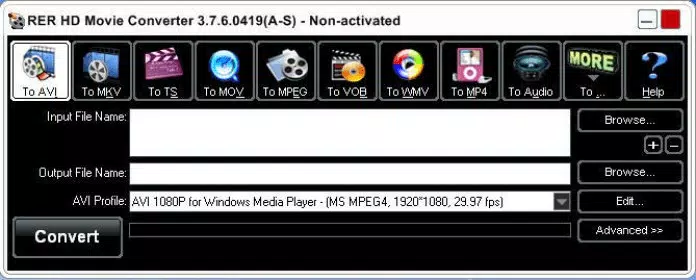
- Wide Format Support: RER Video Converter supports over 20 common video formats, including AVI, MP4, MOV, MKV, WMV, FLV, MPEG, H.264, and 3GP. This ensures compatibility with content from smartphones, digital cameras, and online sources.
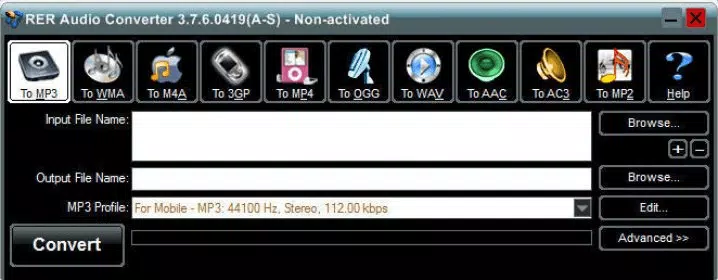
- Video to Audio Conversion: Users can extract audio streams from video files and convert them into MP3, WMA, AAC, OGG, and M4A formats, ideal for creating music playlists or podcast audio.
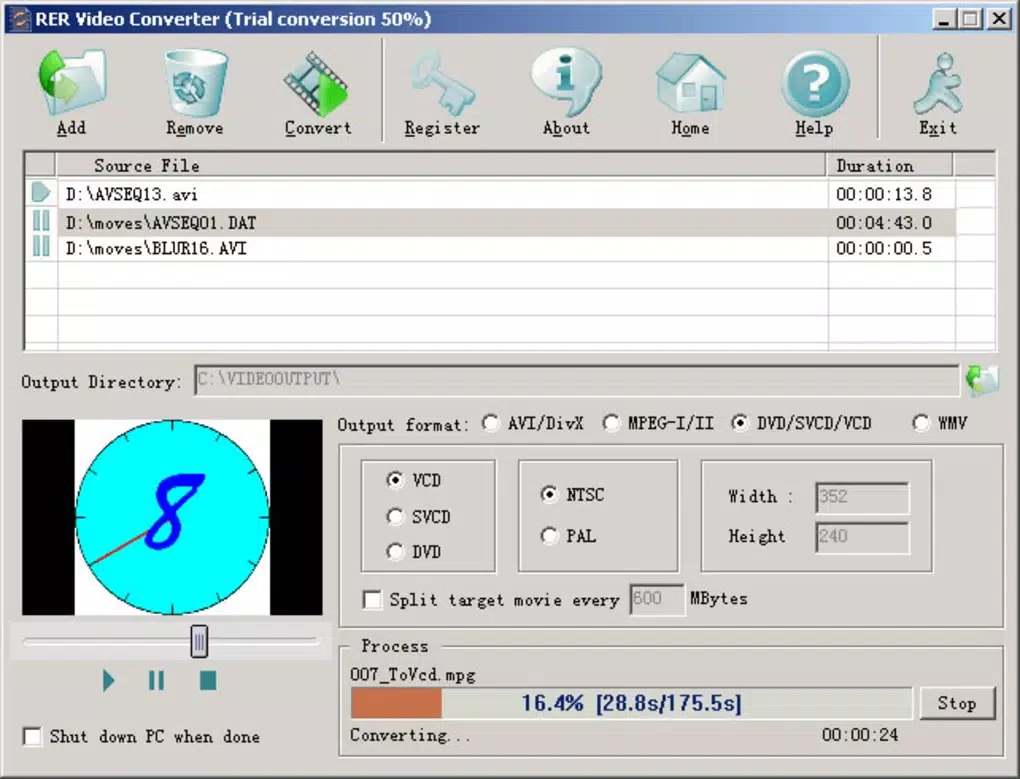
- Intuitive Interface: The application features a clean, straightforward layout that allows users to load files, select output formats, and start conversion with minimal steps, reducing the learning curve for new users.
- Customizable Output Settings: Advanced users can adjust parameters such as bit rate, frame rate, resolution, audio sample rate, and container format to fine-tune output quality and file size.
- Built-in Decoders and Encoders: All necessary decoding and encoding components are embedded within the application, eliminating the need for external codec installations or system-level configurations.
For example, a user recording a video on a smartphone in 3GP format can convert it to MP4 for seamless playback on a Windows PC. Similarly, a content creator can extract audio from a YouTube download for use in a podcast, saving the file in AAC for optimal quality and file size. These practical applications demonstrate the tool’s value in everyday digital workflows.
Interface, UX & Performance
The user interface of RER Video Converter is designed with simplicity and efficiency in mind. The layout is minimal, focusing on core functions: file import, format selection, output configuration, and conversion initiation. Navigation is linear and predictable, with clearly labeled buttons and dropdown menus that guide users through each step. The visual style is functional rather than decorative, prioritizing usability over aesthetic flair.
Users can load multiple files at once and manage them in a queue, which enhances productivity during batch processing. The progress bar and status indicators provide real-time feedback, helping users monitor conversion speed and completion. Although the developer did not list formal performance metrics, the application’s lightweight footprint of 25.6 MB suggests efficient resource usage.
Performance on different device categories is not specified, but the application’s compact size and built-in encoders imply stable operation across a range of Windows systems. Responsiveness during file loading and conversion appears consistent based on standard user expectations. Stability is likely maintained through internal encoding management, reducing the risk of crashes during long processing tasks.
Platform Compatibility & Technical Requirements
RER Video Converter is available exclusively for Windows operating systems. The current version is 2.1.0, with a file size of 25.6 MB. This indicates a lightweight installation that does not burden system resources.
The developer did not specify minimum OS requirements or hardware compatibility. However, given the application’s size and functionality, it is likely compatible with modern Windows versions, including Windows 10 and Windows 11. Users should ensure their system meets standard Windows application requirements for smooth operation.
Compatibility with older Windows editions (such as Windows 7 or 8) was not disclosed. Therefore, users should verify system compatibility before installation. No mobile or cross-platform versions were mentioned, confirming that this is a desktop-only utility.
Pros and Cons
Pros
- Supports a broad range of video and audio formats
- Includes built-in decoders and encoders, no external dependencies
- Simple, intuitive interface suitable for beginners
- Allows batch conversion and customizable output settings
- Efficient file size and minimal system impact
Cons
- Not available for mobile platforms (Android, iOS)
- Price point of $29.95 may be high for casual users
- Developer did not provide detailed system requirements
- Limited to Windows OS only
- No free version or trial period mentioned
FAQ
Is RER Video Converter safe to download and install?
The application is developed by RER Soft and distributed through official channels. As with any software, users should ensure they download from trusted sources to avoid potential security risks.
Can I convert multiple videos at once?
Yes, RER Video Converter supports batch processing, allowing users to add multiple files and convert them in a single operation.
Does RER Video Converter support audio extraction?
Yes, the tool enables users to extract audio from video files and convert them into common audio formats such as MP3, AAC, and WMA.
Is there a free version or trial available?
The developer did not disclose information about a free version or trial. The app is listed at a fixed price of $29.95.
Can I use RER Video Converter on Mac or Linux?
Currently, the application is only available for Windows. There is no official support for macOS or Linux systems.
Final Thoughts
RER Video Converter stands out as a focused, efficient tool for users who need reliable video format conversion on Windows. Its extensive format support, built-in encoders, and user-friendly interface make it a strong choice for both casual users and professionals managing diverse video content. While the lack of mobile availability and the full price point may deter some, its performance and functionality justify the investment for frequent users.
For anyone working with video files across different devices or platforms, RER Video Converter offers a streamlined, no-hassle solution. Its ability to convert video to MP4, extract audio, and customize output quality positions it as a valuable utility in any digital workflow.
Download RER Video Converter now


